The Ultimate Guide to LMS SSO: SAML, OAuth, and OIDC Explained

Picture this: it's a new hire's first Monday. Between setting up a laptop, completing HR paperwork, and attending onboarding meetings, IT sends one more login—this time for the learning management system. It's just another username and password to remember.
She never opens the course. Not because she isn't interested, but because one more password feels like one login too many.
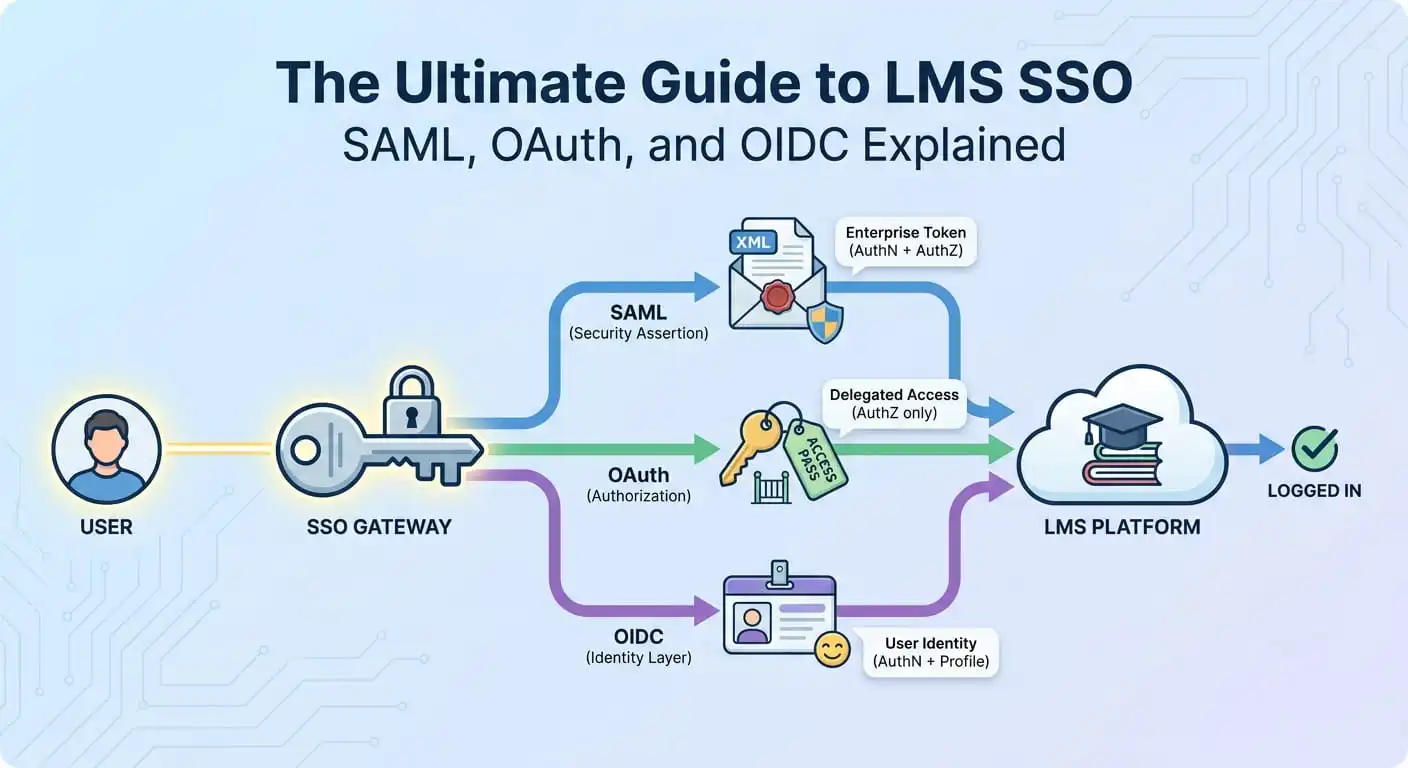
That's why HR and IT teams increasingly rely on LMS Single Sign-On (LMS SSO). It lets employees access the LMS using their existing workplace credentials, creating a smoother and more secure login experience. Behind that seamless access are authentication protocols like SAML, OAuth, and OpenID Connect (OIDC).
This guide walks through what LMS SSO actually is, how SAML, OAuth, and OIDC differ, how the handshake actually works under the hood, and how to decide which one fits your organization.
Why Passwords Are the Real Enemy of LMS Adoption
Here's something L&D teams learn the hard way: the best course library in the world is useless if people can't get into it without friction.
Every extra login screen is a small tax on motivation. A learner who has to dig up a forgotten LMS password is a learner who's one click away from closing the tab and telling themselves they'll "do it later." Later rarely comes.
There's also a cost that IT feels more acutely than anyone else: password fatigue leads to weak passwords, reused passwords, and a steady trickle of help desk tickets. Every "I forgot my LMS password" reset request is time an IT admin isn't spending on something else.
And then there's the security angle. Standalone LMS credentials are one more set of usernames and passwords that can be phished, leaked, or forgotten in a spreadsheet somewhere.
Centralizing authentication through a company's existing identity provider isn't just convenient—it's a genuine security upgrade.
This is exactly the gap that LMS SSO closes.
What Is LMS SSO?
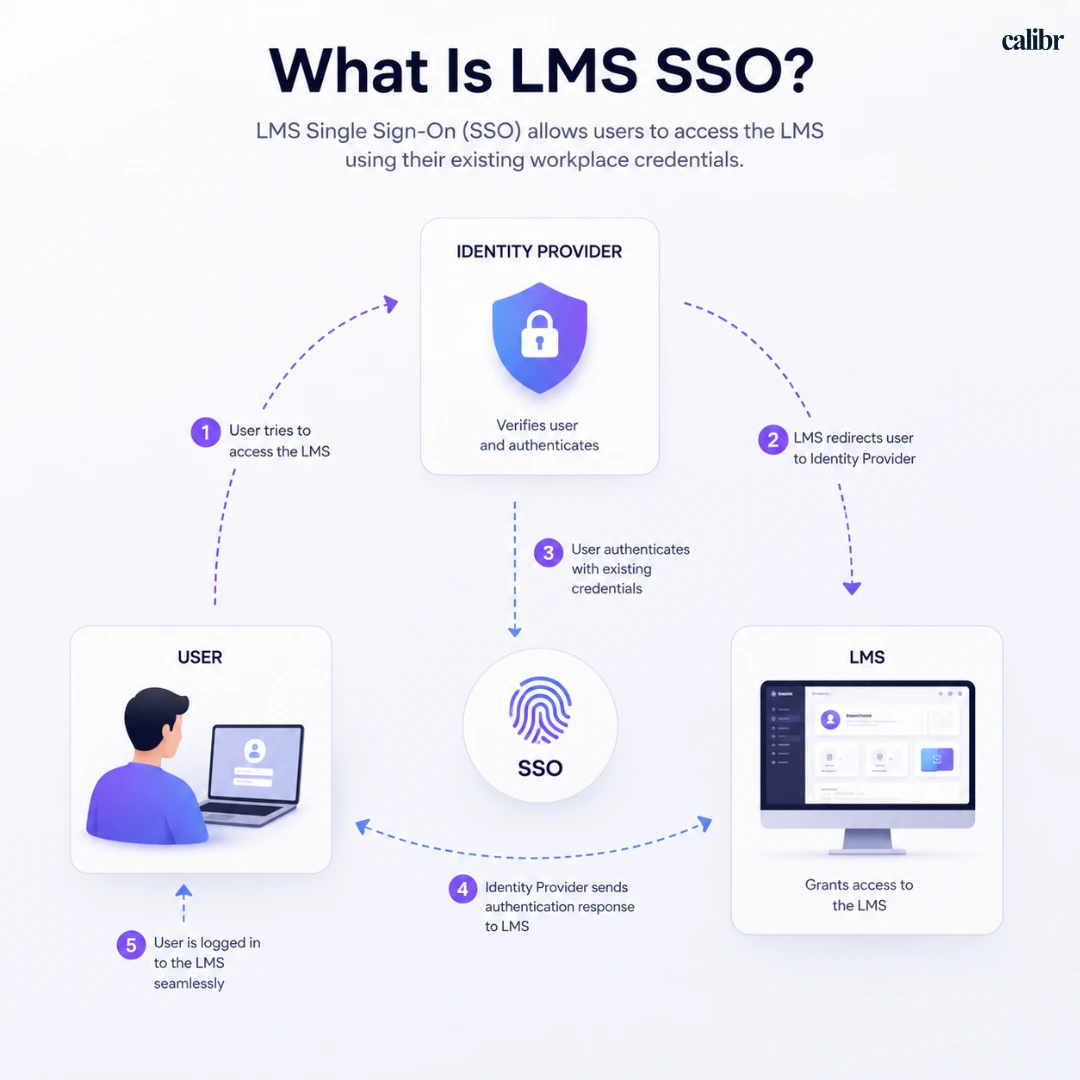
LMS Single Sign-On (LMS SSO) enables employees to access their learning platform using the same workplace credentials they already use for applications like Microsoft 365, Google Workspace, or Okta. Instead of remembering another username and password, they can securely access learning with a single login.
“ From the learner's side, it feels almost invisible. Click the course link in an email, land straight in the LMS, no login screen in sight. From the organization's side, it means one identity system, one place to manage access, and one place to instantly revoke access when someone leaves the company. This centralized approach simplifies LMS authentication, reduces password fatigue, and improves security across the organization.“
But "SSO" is really shorthand for a handshake between three parties: the person logging in, the LMS (which wants proof of who they are), and the identity provider (which holds that proof). How that handshake happens—what gets exchanged, in what format, and under what rules—is where SAML, OAuth, and OIDC come in.
Quick Comparison: SAML vs. OAuth vs. OIDC
Before diving deeper into each protocol, here's a quick overview. If you're short on time, this table will help you understand the key differences at a glance.
Feature | SAML | OAuth | OIDC |
Primary Purpose | Authentication | Authorization | Authentication + Identity |
Best For | Enterprise SSO | API and application integrations | Modern web and mobile applications |
Confirms User Identity? | Yes | No | Yes |
Grants Access to Resources? | Indirectly, via attributes | Yes, via scoped access tokens | Yes, via access tokens |
Data Format | XML | Access Tokens | JSON Web Tokens (JWT) |
Common Use Case in an LMS | Employee login using corporate credentials | Connecting the LMS to HRIS, calendars, or other business applications | Secure login for cloud-based and mobile-friendly LMS platforms |
Works Well With | Microsoft Entra ID, ADFS, Okta | APIs and third-party services | Google Workspace, Microsoft Entra ID, Okta |
Ideal For | Large enterprises | Developers and integrations | Organizations building modern digital workplaces |
SAML itself has no concept of scopes or tokens the way OAuth does. What it grants is identity plus attributes—role, department, manager—carried inside the signed assertion. Downstream systems use those attributes to make their own authorization decisions. OAuth, by contrast, issues a token that directly represents a scoped grant of access.
Don't worry if the differences aren't completely clear yet. The next sections break down each protocol with simple analogies, real-world LMS examples, and practical guidance so you can decide which one fits your organization.
To understand how this works, it's important to look at the authentication protocols that power LMS SSO.
What Happens Behind the Scenes During Login
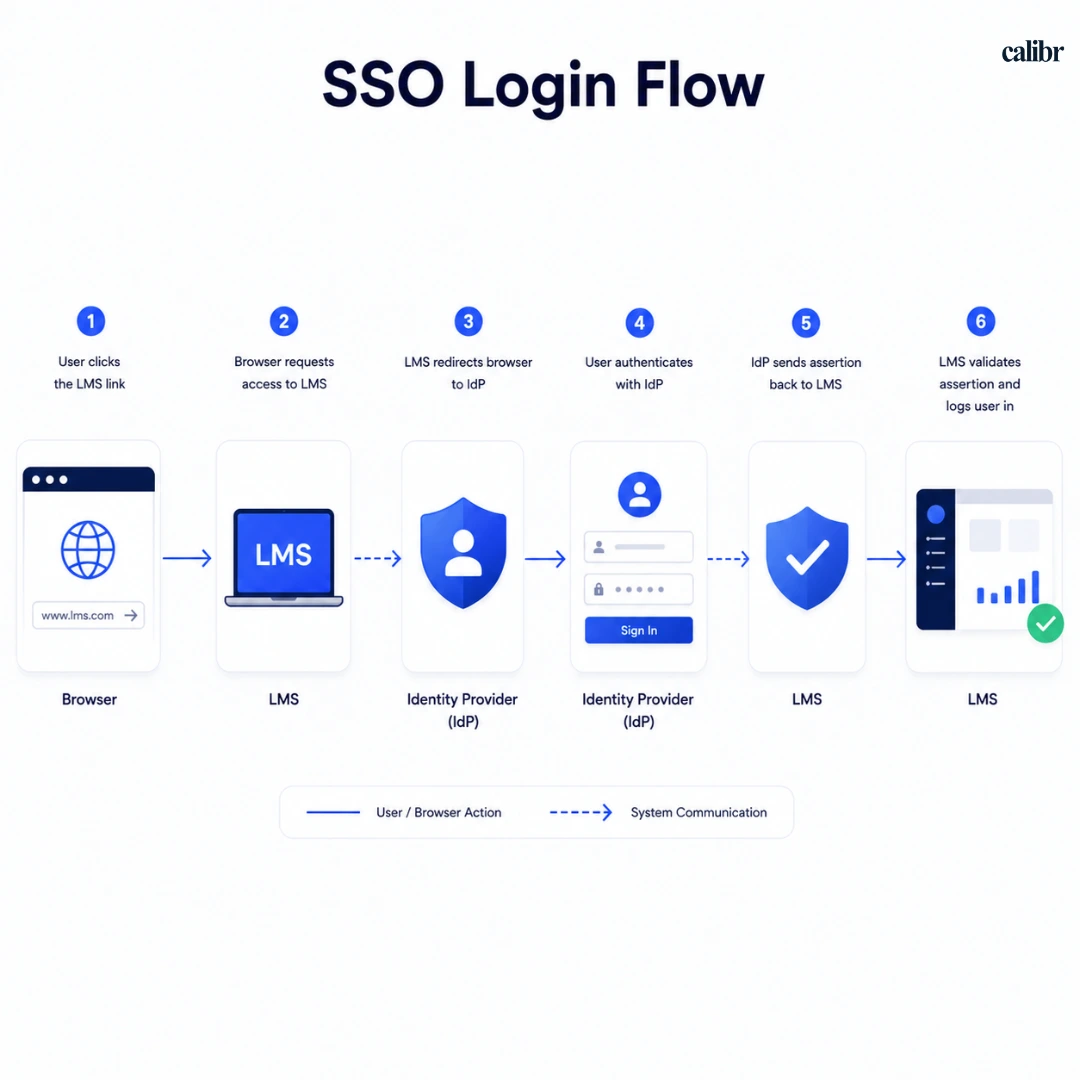
Before comparing protocols, it helps to understand the basic choreography, because SAML, OAuth, and OIDC are really just different scripts for the same play.
An employee clicks a link to the LMS.
The LMS notices there's no valid session and redirects the browser to the company's identity provider.
The identity provider checks if the employee is already signed in elsewhere (often they are, from checking email that morning). If not, it prompts for credentials.
Once verified, the identity provider sends proof of identity back to the LMS—this proof looks very different depending on the protocol.
The LMS checks that proof, creates a session, and the employee lands inside their course dashboard.
That fourth step—the shape and contents of the "proof"—is the whole story of SAML vs OAuth vs OIDC.
Although several authentication steps happen behind the scenes, the entire process usually takes just a few seconds, creating a seamless LMS authentication experience for learners.
Understanding the Authentication Protocols Behind LMS SSO
The answer to "what actually carries that authentication information between your identity provider and the LMS" lies in authentication protocols—standardized sets of rules that determine how user identities are verified, how login information is exchanged, and how secure access is granted. While several authentication protocols exist, SAML, OAuth, and OpenID Connect (OIDC) are the three you'll encounter most often when implementing LMS SSO.
Each protocol was designed to solve a slightly different problem. Understanding what each one does—and where it fits—makes it much easier to choose the right approach for your organization.
SAML: Why It's Still the Enterprise Standard
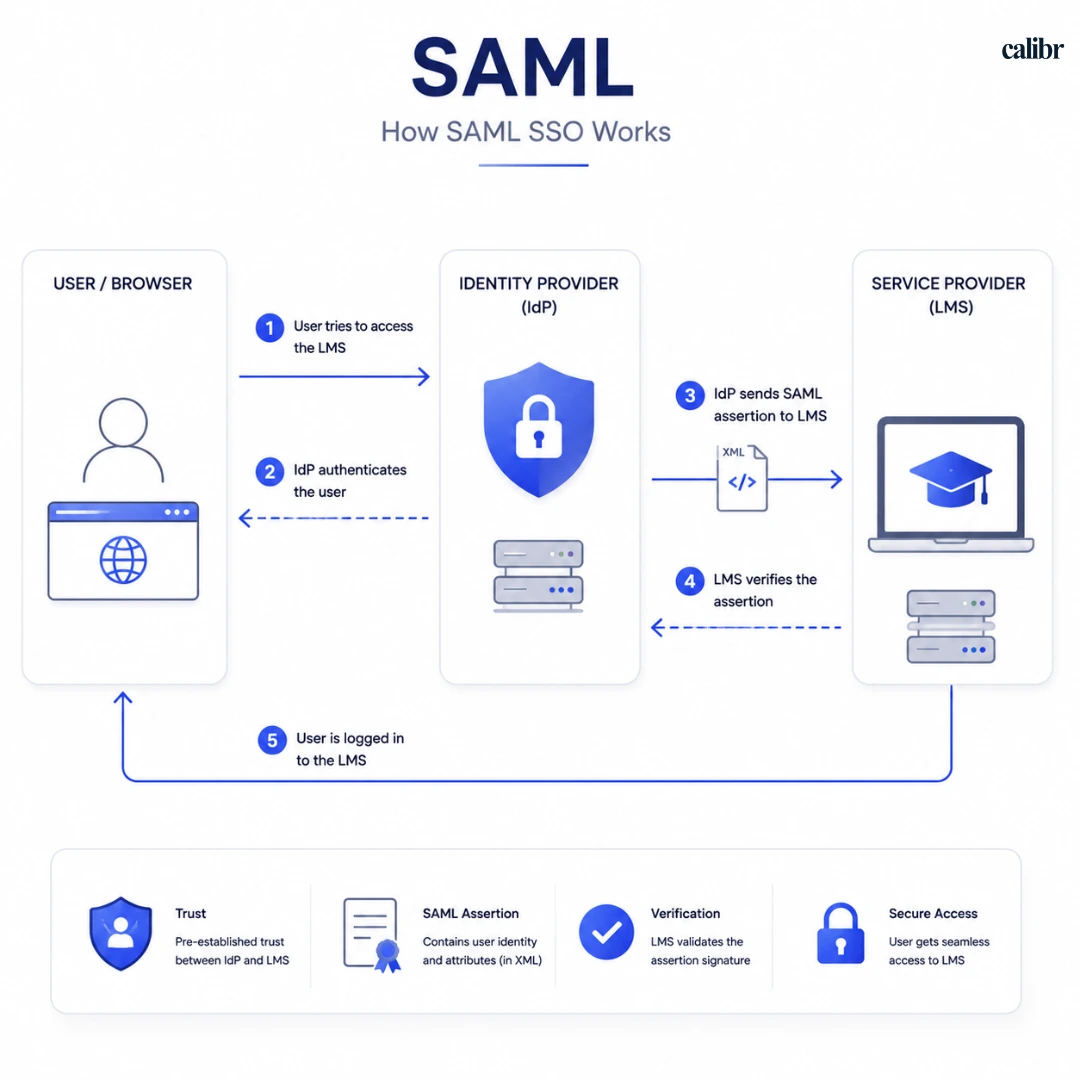
Think of SAML like a notarized letter. The identity provider writes up a formal, signed document that says, "I, the identity provider, confirm this is Jane Doe, she works in the Sales department, and she's authorized to access this system." The LMS reads the letter, checks the signature, and lets Jane in.
In practice, this means the LMS never needs to store or verify the user's password itself. Instead, it trusts the identity provider to authenticate the user and simply accepts the verified identity that comes back. This creates a centralized, secure login experience while allowing IT teams to manage user access from a single location.
That "letter" is technically an XML document, exchanged between the browser, the identity provider, and the LMS using the SAML protocol. SAML has been the backbone of enterprise single sign-on for more than two decades and remains one of the most widely adopted authentication protocols across enterprise applications. If your organization already uses SAML for other business systems, connecting your LMS through the same standard is usually the simplest and most consistent approach.
If you'd like to explore the technical details behind the protocol, the official SAML specification is maintained by OASIS, the organization responsible for developing and standardizing the SAML framework.
Where SAML shines:
Large enterprises with established identity infrastructure
Organizations already using SAML or other SaaS tools
Environments where IT wants tight, auditable control over authentication
Where it gets clunky:
Mobile apps and modern single-page applications, where SAML's browser-redirect-heavy flow feels dated
Smaller organizations without dedicated IT resources to manage XML configurations and certificate rotations
OAuth: Granting Secure Access Without Sharing Passwords
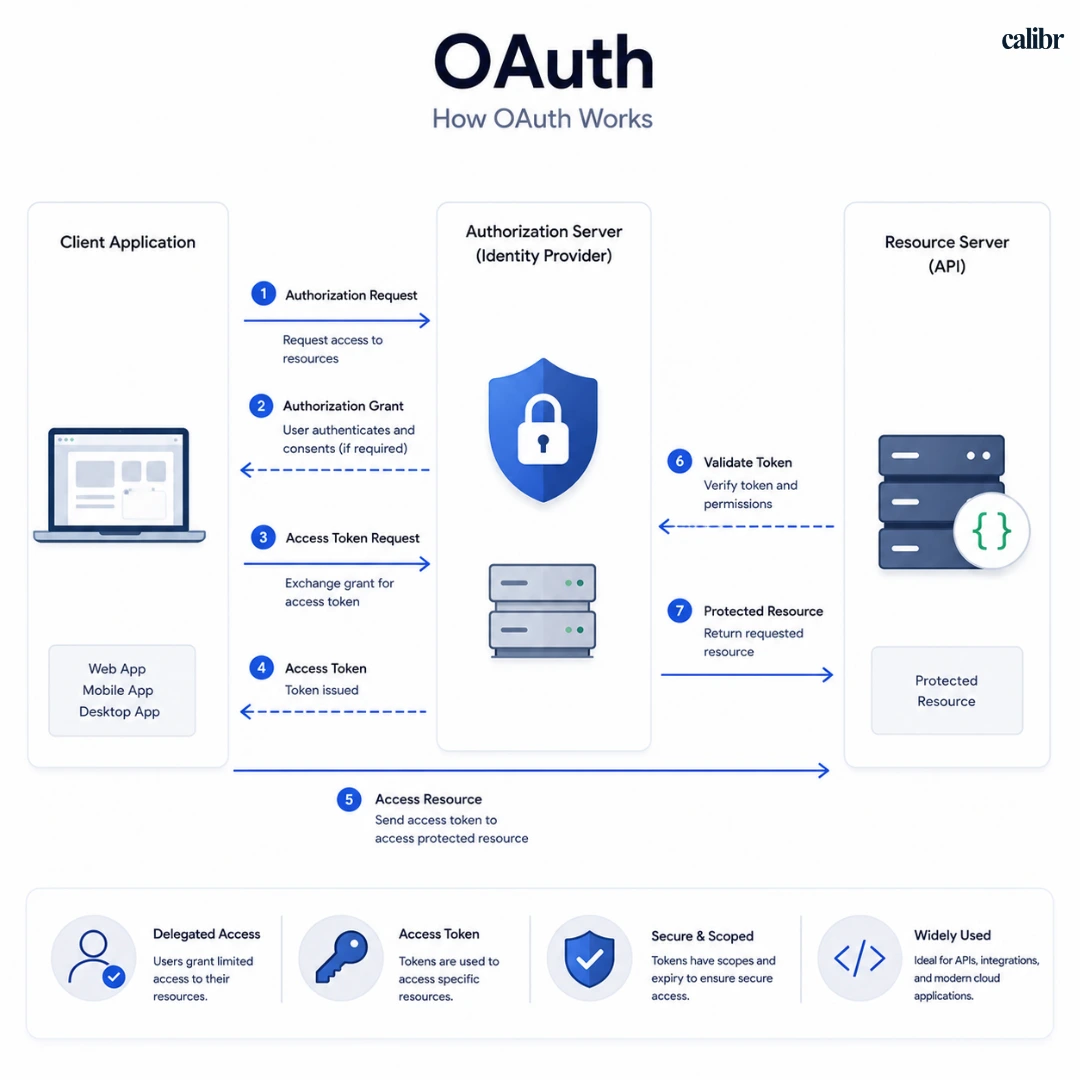
OAuth gets confused with authentication constantly, but it was never really designed to answer "who is this person?" It was designed to answer a narrower question: "what is this person allowed to access, and for how long?"
The valet key analogy fits well here. When you hand a valet your car keys, you're not handing over your house keys, your garage remote, and your glovebox combination—you're handing over a limited key that starts the engine and opens the door, nothing more.
OAuth works the same way: it issues an access token that lets one system reach into another system's data on your behalf, scoped to specific permissions, without ever exposing your actual password.
For an LMS, OAuth typically comes into play when the platform needs to securely connect with other business applications—such as syncing calendars, integrating with an HRIS, accessing cloud storage, or communicating with third-party APIs. Rather than acting as the primary login method, OAuth enables secure data sharing without exposing user credentials.
It's worth distinguishing which OAuth grant type is actually in play, because the two get lumped together constantly:
Authorization Code grant — a user-facing, browser-redirect flow, typically paired with PKCE for public clients (mobile apps, SPAs) so an intercepted authorization code can't be exchanged by an attacker.
Client Credentials grant — no user in the loop at all. This is the one you'd actually reach for when the LMS talks to an HRIS or calendar system server-to-server, using a client ID and secret rather than a redirect flow.
If you'd like to explore the technical specification behind OAuth 2.0, the official OAuth 2.0 Authorization Framework (RFC 6749) published by the Internet Engineering Task Force provides a detailed overview of how the protocol works.
Where OAuth shines:
Connecting the LMS to third-party services and APIs
Granting limited, scoped access instead of full credential sharing
Modern app-to-app integrations
Where it gets clunky:
Used alone for login, it leaves gaps around verifying actual user identity—which is exactly the problem OIDC was built to solve
OIDC: Modern Authentication Built on OAuth
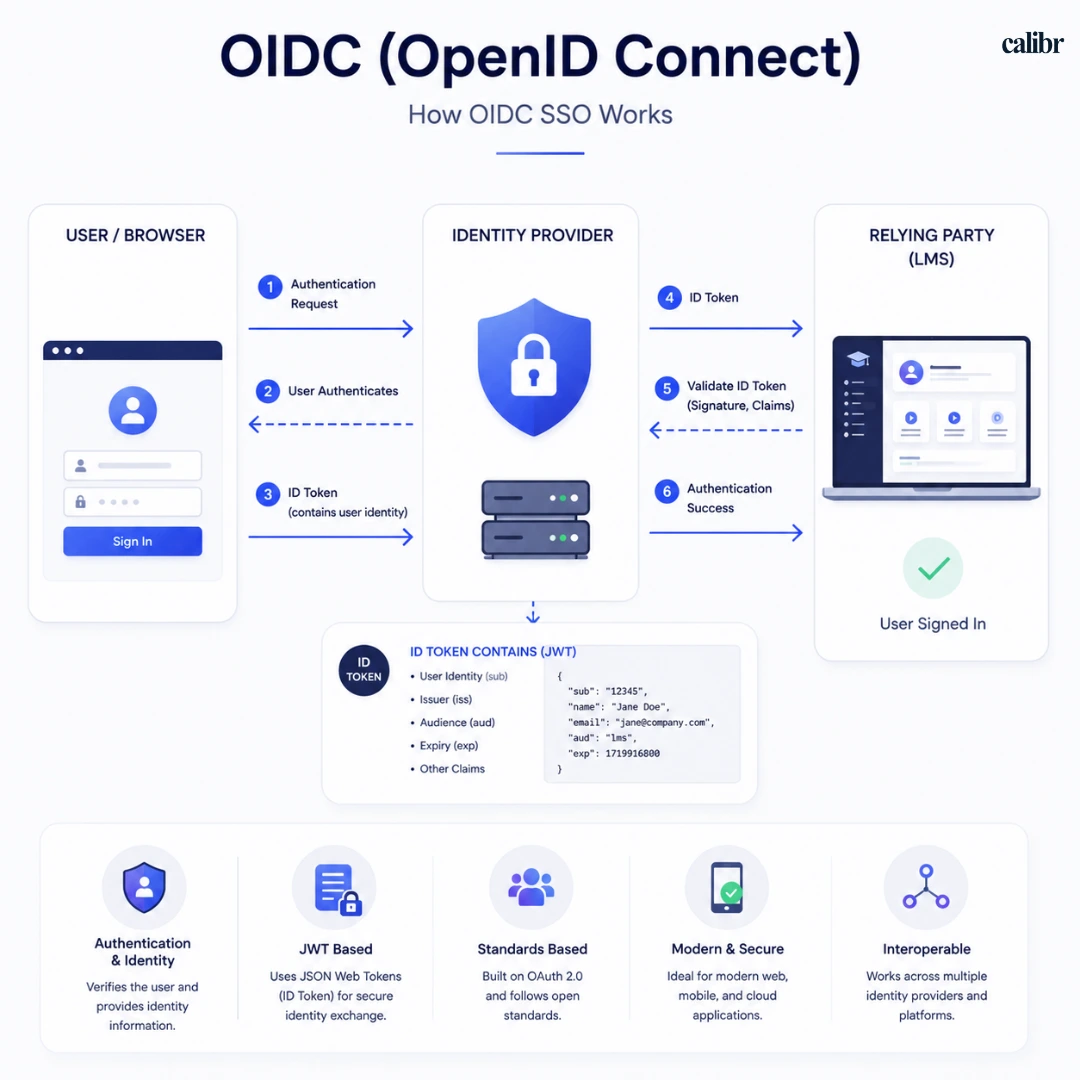
OIDC—OpenID Connect—takes OAuth's valet key mechanism and adds a proper identity badge on top of it. It's built directly on OAuth 2.0, but it adds a standardized "ID token" that clearly states who the person is, alongside the access token that governs what they can do.
If SAML is a notarized letter and OAuth is a valet key, OIDC is like a hotel key card that also happens to have your photo, name, and room number printed on it. It proves both your identity and your access rights in one lightweight, modern package—and it's built for the way people actually use apps today, including on mobile devices.
If you'd like to learn more about how OpenID Connect works behind the scenes, the official OpenID Connect Documentation from the OpenID Foundation provides a detailed overview of the protocol.
OIDC has become the default choice for a lot of newer enterprise software because it's lighter than SAML (using JSON instead of XML), works cleanly with mobile and single-page apps, and plays nicely with modern identity providers like Google Workspace and Microsoft Entra ID. Discovery also makes it far less manual to stand up than SAML: instead of hand-exchanging metadata files, a compliant IdP publishes a .well-known/openid-configuration document that the LMS can read to auto-configure its endpoints, signing keys, and supported scopes.
For many modern cloud-based LMS platforms, OIDC has become the preferred authentication protocol because it's lightweight, secure, and designed to deliver a seamless experience across web and mobile applications.
Where OIDC shines:
Mobile-first or app-first LMS experiences
Organizations using modern identity providers that support it well
Teams that want faster, lighter authentication without XML overhead
Where it gets clunky:
Some older enterprise systems and legacy identity infrastructure still only support SAML
Technical Deep Dive: How the Handshake Actually Works, Protocol by Protocol
The sections above cover what each protocol does. This section is for the people who have to actually implement, debug, and secure the integration.
The SAML flow, step by step
The LMS (the Service Provider, or SP) redirects the browser to the IdP's Single Sign-On endpoint, optionally including a signed AuthnRequest.
This can happen two ways: SP-initiated, where the user starts at the LMS and gets bounced to the IdP, or IdP-initiated, where the user starts from the identity provider's own portal (common in enterprise environments with an app launcher).
The IdP authenticates the user and constructs a SAMLResponse containing a signed Assertion—the XML block with the user's identity and attributes.
That response is delivered back to the LMS's Assertion Consumer Service (ACS) URL, most commonly via an HTTP-POST binding (an auto-submitting HTML form), though HTTP-Redirect bindings exist for smaller payloads.
The LMS validates the assertion's XML signature against the IdP's public certificate, checks the assertion hasn't expired, and confirms the audience restriction matches its own entity ID before creating a session.
Security notes that matter in practice: signature validation is not optional—an SP that accepts an unsigned or improperly validated assertion has a full authentication bypass. This is also the protocol family behind XML Signature Wrapping attacks, a well-documented SAML vulnerability class where an attacker manipulates the XML structure so a validly-signed assertion appears to say something it doesn't; a properly implemented SAML library guards against this, but it's a reason to lean on a maintained library rather than hand-rolling assertion parsing. Certificate rotation is the other operational risk—an expired IdP signing certificate silently breaks login for every user until someone notices.
The OIDC flow, step by step
The LMS redirects the browser to the IdP's /authorize endpoint with client_id, redirect_uri, scope=openid profile email, a state parameter, and a nonce.
The user authenticates at the IdP (or has an existing session), and the IdP redirects back to the LMS's redirect_uri with a short-lived authorization code.
The LMS's backend exchanges that code at the IdP's token endpoint for an id_token (a signed JWT) and an access_token.
The LMS validates the id_token: signature against the IdP's public keys (fetched from the JWKS endpoint referenced in the discovery document), iss matches the expected issuer, aud matches the LMS's client ID, exp hasn't passed, and nonce matches what was sent in step 1.
Once validated, the LMS reads the claims inside the token (sub, email, name, and any custom claims) and creates a session.
Security notes that matter in practice: state protects against CSRF on the callback; nonce protects against replay of a previously-issued token. Skipping nonce validation is a common real-world misconfiguration and one of the more frequent root causes when "SSO auth got bypassed" incidents get traced back to a root cause. Many IdPs also support acr_values for requesting a specific authentication context (e.g., step-up MFA) and custom scopes beyond the standard openid profile email—useful for government or high-assurance IdPs, and something to check for when a new identity provider joins your environment.
A quick word on JWT structure
Since OIDC's id_token is a JWT, it's worth unpacking what that actually is: three base64url-encoded segments separated by dots—header.payload.signature. The header specifies the signing algorithm; the payload carries the claims (sub, iss, aud, exp, plus whatever else the IdP includes); the signature lets the receiving system verify the token hasn't been tampered with, without needing to call back to the IdP for every check. That verifiability offline (once you have the IdP's public key) is a big part of why OIDC feels "lighter" than SAML in practice, even though the two are solving overlapping problems.
Session termination: the part everyone underestimates
Login gets most of the attention; logout quietly causes more support tickets. SAML Single Logout (SLO) and OIDC RP-initiated logout both exist on paper, but implementations vary a lot between identity providers—some support back-channel logout (server-to-server, invisible to the user), others only front-channel (redirect-based, which breaks if a user has multiple tabs open), and some vendor-specific IdPs deviate from the spec entirely, requiring nonstandard parameters on the logout redirect. Budget real testing time for this rather than assuming "it's SSO, logout should just work."
Multi-tenant SSO: one LMS, many identity providers
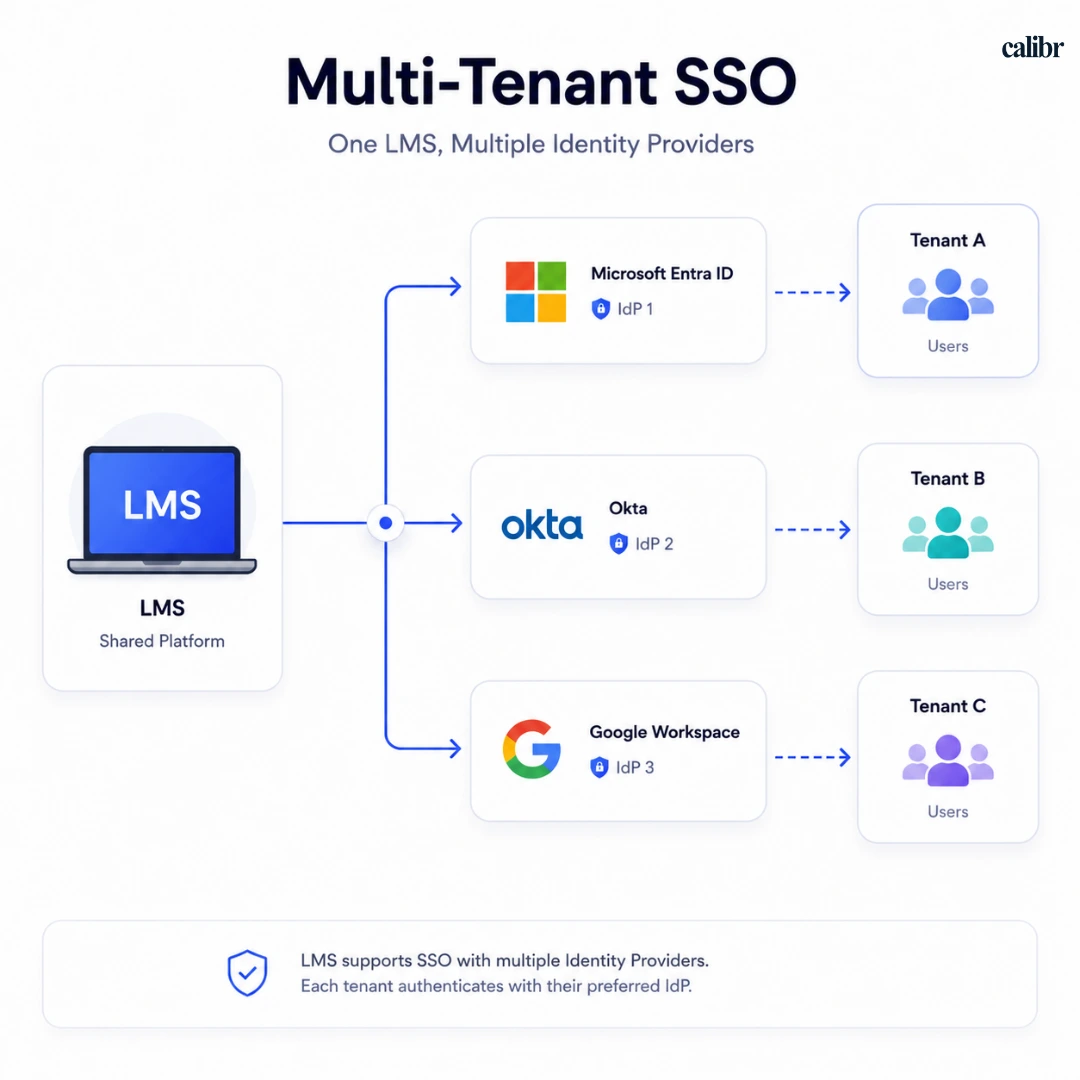
Most SSO guides stop at a single organization talking to a single IdP. Real enterprise LMS deployments usually need to support many tenants, each with their own identity provider, and the tricky part is that the LMS has to figure out which IdP to use before the user has even authenticated.
A few patterns handle this:
Subdomain-based resolution — acmecorp.yourlms.com maps directly to Acme's configured IdP.
Email domain matching — the user types their email first, the LMS looks up which tenant (and which IdP config) owns that domain, then kicks off the appropriate flow.
Organization picker — a manual "select your company" step before redirecting.
Underneath that resolution step, the LMS needs a way to store and serve per-tenant identity provider configuration dynamically—SAML certificates and metadata for one tenant, OIDC discovery URLs and client secrets for another—rather than hardcoding a single strategy. In practice this means keeping a strategy or provider instance per tenant rather than one global configuration, since two tenants can be on entirely different protocols at once, and secrets need to be stored and rotated independently per tenant rather than as a single shared credential.
Decision Framework: Which LMS SSO Protocol Fits Your Organization?
Understanding SAML, OAuth, and OIDC is the first step. Now, let's see which authentication protocol best fits your LMS and identity infrastructure.
If your organization... | Choose | Why it's the best fit |
Already uses SAML for enterprise applications | SAML | Keeps authentication consistent across existing business applications and simplifies IT management. |
Relies on legacy systems or strict compliance requirements | SAML | A mature, widely adopted authentication standard trusted by large enterprises. |
Is implementing a new cloud-based or mobile-friendly LMS | OIDC | Lightweight, faster, and designed for modern web and mobile applications. |
Uses Microsoft Entra ID, Google Workspace, or Okta with OIDC support | OIDC | Offers seamless integration with modern identity providers and better user experiences. |
Needs to connect the LMS with HRIS, CRM, calendars, or other third-party applications | OAuth (alongside SAML or OIDC) | Securely grants applications permission to access data without exposing user credentials. |
Wants the best user experience for remote or frontline employees | OIDC | Reduces login friction and works well across multiple devices and platforms. |
Has a dedicated Identity & Access Management (IAM) team | SAML | Provides greater control, customization, and enterprise-grade security. |
Is unsure which protocol to choose | Follow your Identity Provider | In most cases, your existing identity provider and IT infrastructure determine the best authentication protocol. |
Quick Recommendation
Still unsure? Use this simple rule of thumb:
Choose SAML if your organization already relies on enterprise SSO and legacy infrastructure.
Choose OIDC if you're adopting a modern, cloud-first LMS with mobile users.
Use OAuth whenever your LMS needs secure access to other applications or APIs—it complements SAML or OIDC rather than replacing them.
Common LMS SSO Mistakes (and How to Avoid Them)
Implementing LMS SSO is only the first step. The table below outlines common mistakes and best practices to help keep your SSO implementation secure and reliable.
Common Mistake | Why It Matters | Best Practice |
Skipping a pilot rollout | A company-wide rollout without testing can lead to login failures and a surge in IT support requests. | Test SSO with a small pilot group across different devices, browsers, and user roles before full deployment. |
Ignoring certificate expiration | Expired SAML certificates can suddenly prevent users from accessing the LMS. | Monitor certificate expiry dates and renew them well in advance. |
Incorrect attribute mapping | Users may receive incorrect roles, permissions, or course assignments. | Validate user attributes such as department, role, and manager during implementation and after updates. |
Overlooking mobile compatibility | SSO may work on desktop but fail on mobile browsers or native apps. | Verify the login experience across desktops, mobile devices, and LMS applications. |
Treating SSO as a one-time setup | Identity providers and security settings evolve over time, potentially breaking authentication. | Regularly review, test, and update your LMS SSO configuration after major IdP or LMS changes. |
Not enabling Multi-Factor Authentication (MFA) | Password-only authentication increases the risk of unauthorized access. | Strengthen security by enforcing MFA through your identity provider. |
Granting excessive permissions | Users may gain access to courses or administrative features they don't need. | Apply the principle of least privilege and review permissions periodically. |
Ignoring authentication logs | Suspicious login attempts or repeated failures may go unnoticed. | Monitor and audit login activity to identify and respond to potential security threats quickly. |
Skipping nonce and state validation (OIDC/OAuth) | Leaves the callback open to replay and CSRF attacks. | Validate state on every callback and nonce inside every id_token before creating a session. |
Assuming logout is symmetric with login | SAML SLO and OIDC RP-initiated logout behave inconsistently across IdPs, leaving stale sessions behind. | Explicitly test front-channel and back-channel logout with each IdP you support. |
Bottom line: A successful LMS SSO implementation isn't just about choosing the right protocol—it's about careful planning, thorough testing, and ongoing maintenance. Following these best practices helps deliver a secure, reliable, and friction-free login experience for both learners and administrators.
LMS SSO Checklist Before You Go Live
A successful LMS authentication strategy doesn't end with choosing the right protocol—it also requires careful planning and ongoing maintenance. Use this LMS SSO Checklist before deployment to ensure your implementation is secure, reliable, and ready for a smooth rollout.
[ ] Identity provider confirmed (Okta, Microsoft Entra ID, Google Workspace, or other)
[ ] Protocol selected based on existing infrastructure (SAML or OIDC)
[ ] Attribute mapping tested (department, role, manager, location)
[ ] Pilot group tested across desktop, mobile, and major browsers
[ ] Certificate expiration dates documented and calendared
[ ] Multi-factor authentication enabled at the identity provider
[ ] Fallback login process defined in case SSO fails
[ ] Audit logging enabled and reviewed periodically
[ ] Vendor support contact confirmed for SSO-specific issues
[ ] state and nonce validated on every OIDC/OAuth callback
[ ] Logout tested end-to-end (front-channel and back-channel) for each connected IdP
[ ] Per-tenant IdP configuration isolated and secrets rotated independently (multi-tenant deployments)
How Calibr Simplifies LMS SSO
Understanding SAML, OAuth, and OIDC is only part of the journey. The next step is choosing an LMS that supports these authentication standards without adding unnecessary complexity.
Calibr's LMS with SSO supports SAML 2.0, OpenID Connect (OIDC), and OAuth 2.0, allowing organizations to integrate seamlessly with leading identity providers such as Microsoft Entra ID, Google Workspace, Okta, and more. Whether you're deploying a new enterprise LMS or modernizing your existing learning ecosystem, Calibr makes secure, single sign-on simple to implement and easy to manage.
Beyond authentication, Calibr also provides centralized user management, granular access controls, AI-powered learning experiences, and dedicated implementation support. This commitment to security is further reinforced by Calibr's ISO/IEC 27001 certification, reflecting our focus on protecting customer information through internationally recognized information security standards.
Whether you're implementing LMS SSO for the first time or scaling it across a global workforce, Calibr helps deliver a secure, friction-free learning experience from day one.
Frequently Asked Questions (FAQs)
What is LMS SSO?
LMS SSO lets employees log into a learning management system using their existing company credentials, rather than a separate LMS-specific username and password.
How does LMS SSO work?
When a learner tries to access the LMS, they're redirected to the company's identity provider, which verifies their identity and sends proof back to the LMS, granting access without a separate login.
What is SAML?
SAML is an XML-based authentication standard that lets an identity provider vouch for a user's identity to another application, commonly used in enterprise single sign-on.
What is OAuth?
OAuth is an authorization framework that grants limited, scoped access to a user's data or resources without sharing their actual password, often used for connecting apps to each other.
What is OIDC?
OIDC, or OpenID Connect, is an identity layer built on top of OAuth 2.0 that adds a standardized way to verify who a user is, in addition to what they're authorized to access.
What is the difference between SAML and OAuth?
SAML is built specifically for authentication—confirming identity—while OAuth is built for authorization—granting scoped access to resources, often between different applications.
Which protocol should my LMS use?
Most organizations should match whatever their identity provider and existing enterprise apps already use—SAML for established enterprise environments, OIDC for newer, mobile-friendly setups.
Is OIDC replacing SAML?
Not entirely. OIDC is gaining ground for newer, mobile-first applications, but SAML remains deeply embedded in enterprise infrastructure and isn't disappearing anytime soon—many organizations run both side by side.
Why does nonce matter in OIDC if I already have state?
hey protect against different things. state ties the callback back to the request that started it, preventing CSRF. nonce is embedded inside the signed id_token itself, preventing an attacker from replaying a previously-issued, still-valid token in a new session.
Bringing It All Together
Implementing LMS Single Sign-On isn't about adopting the latest technology—it's about making learning secure, seamless, and frustration-free.
When comparing SAML vs OAuth vs OIDC, there isn't a universal winner. The right choice depends on your identity provider, security requirements, and existing infrastructure.
Ultimately, successful LMS SSO means one simple thing: learners can access training instantly without password barriers. Get that right, and SSO becomes more than an IT feature—it becomes part of a better


Vivetha is a digital marketing professional specializing in content marketing and SEO. She focuses on developing optimized, high-quality content that improves search visibility, supports brand objectives, and drives measurable results. With a structured and analytical approach, she ensures content aligns with business and audience needs.