Adobe Learning vs Calibr
Which Platform delivers the best value: A Comprehensive Comparison
Calibr emerges as the best Adobe Learning Manager alternative for organizations seeking a modern, intuitive, and cost-effective solution. While Adobe Learning Manager offers comprehensive features with Adobe's brand recognition and integration capabilities, Calibr stands out with its superior user experience, faster implementation timelines, transparent pricing model, and exceptional customer support that doesn't require navigating through complex enterprise bureaucracy.
Course Creation with AI
More Affordable Pricing
Average Skill Growth Rate
TL;DR — Adobe Learning vs Calibr
Calibr Highlights
- AI-powered personalized learning paths that adapt to individual learner needs
- Modern, intuitive interface that requires minimal training
- Transparent, predictable pricing without hidden costs
- Advanced analytics with actionable insights, not just data dumps
- Seamless integration ecosystem that works with your existing tools
- Rapid implementation (days, not months)
Adobe Learning Highlights
- Deep integration with existing Adobe ecosystem products
- Suitable for large organizations with high budget
- Long implementation time
- Needs large IT team
Why Calibr Leads:
85% faster course creation
with AI-powered authoring
45% faster skill development
vs. industry average
ROI achieved in 10 months
vs. 16-month average
Predictable, transparent pricing
with all features included
Bottom Line: Calibr is the best Adobe Learning Manager alternative for organizations that want enterprise-level capabilities without enterprise-level complexity and costs. While Adobe Learning Manager serves large corporations with existing Adobe investments, Calibr delivers faster time-to-value, better user adoption rates, and superior ROI for companies ready to embrace modern, efficient learning technology.
Quick Comparison: Adobe Learning vs Calibr
See how Calibr and Adobe Learning stack up across critical capabilities
AI-Powered Content Creation
Advanced drag-and-drop builder with AI-assisted content creation, multimedia support
Limited native authoring
Why It Matters: Powerful authoring capabilities reduce dependency on external vendors and accelerate course creation
Personalized Learning
AI-driven learning paths, adaptive assessments and skill-gap analysis
Add-on feature with additional costs
Why It Matters: Personalized paths increase completion rates by 40% and retention by 60%
Pricing Model
Starting at $2/user/month
Complex, quote-based with hidden fees
Why It Matters: Clear pricing prevents budget surprises and scales affordably as you grow
User Interface
Modern, intuitive interface with minimal training needed, customizable learner dashboard
Complex, requires extensive training
Why It Matters: Intuitive UI reduces training time and increases adoption across all user levels
Mobile Compatibility
Native iOS/Android apps, offline mode, responsive design, push notifications
Responsive web design
Why It Matters: True mobile-first design supports modern, distributed workforce learning habits
Reporting & Analytics
Predictive analytics, custom dashboards, ROI tracking, skills gap analysis
Standard reporting with limited customization
Why It Matters: Advanced analytics identify at-risk learners and recommend interventions proactively
Customer Support
24/7 priority support, dedicated success manager, comprehensive knowledge base
Tiered support requiring premium packages
Why It Matters: Consistent, personalized support ensures platform success regardless of team size
Integrations
Offers seamless integrations with HRMS, CRM, and enterprise tools
Requires custom development or middleware
Why It Matters: Extensive integrations eliminate data silos and streamline administrative workflows
The Calibr Advantage in 3 Numbers:
Average time to create professional courses with Gen AI
Customer satisfaction score
Transparent, affordable starting price
AI-Powered Content Creation & Course Authoring
Transform weeks of content development into hours with intelligent automation
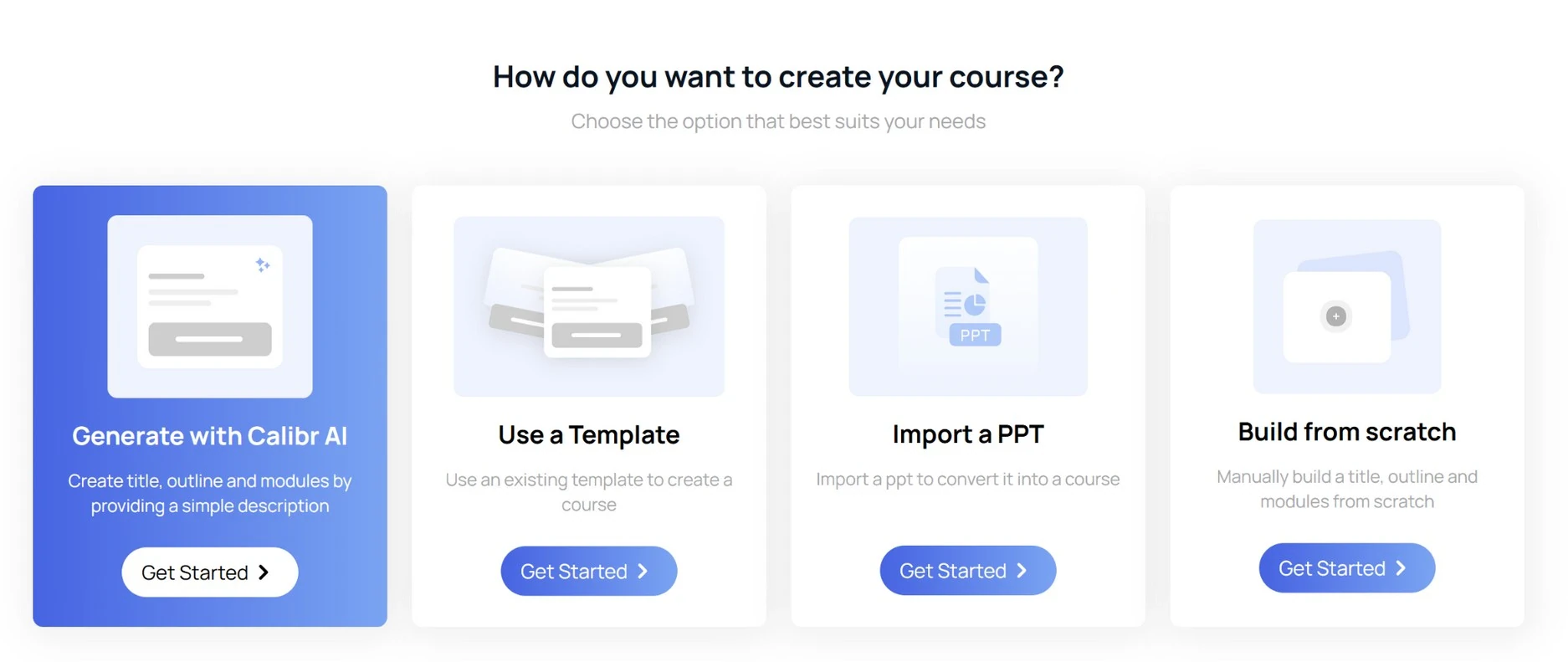
How does Calibr handle AI-powered content creation?
Integrated authoring toolkit with drag-and-drop functionality that allows non-technical users to create professional courses in minutes without external tools or specialized training.
Pre-built templates library featuring 200+ industry-specific course templates covering compliance, onboarding, sales enablement, technical training, and soft skills development.
AI-powered content suggestions that recommend relevant media, assessments, and interactive elements based on learning objectives and industry best practices.
Multi-format support including video, audio, SCORM, xAPI, interactive simulations, gamified elements, and microlearning modules all within the same authoring environment.
Real-time collaboration features enabling multiple team members to co-author, review, and approve content simultaneously with version control and change tracking.
Automated content updates that use AI to identify outdated information and suggest refreshed content based on industry trends and regulatory changes.
"The course authoring tool of Calibr is very intuitive and easy to use. The user interface is very simple and minimalistic."
How does Adobe Learning handle content creation?
Basic authoring capabilities requiring Adobe Captivate Prime or third-party tools for advanced course creation, adding complexity and additional licensing costs.
Limited template selection with generic templates that often require significant customization to meet specific organizational branding and learning needs.
External tool dependency forcing instructional designers to work across multiple platforms (Captivate, Presenter, etc.) creating workflow inefficiencies.
Complex content upload process requiring technical knowledge of file structures, metadata tagging, and LMS-specific formatting requirements.
Separate authoring licenses needed for Adobe's creative tools, significantly increasing total cost of ownership beyond the base LMS subscription.
"The tools to create courses are very basic so it is recommended to create courses using other tools like Captivate and upload the content. You can also add activities and tests, but they also have to be created using another tool because it only allows you to add an external URL for learners to refer to."
Why Choose Calibr Learning Over Adobe for Content Creation?
Personalized Learning Paths & Adaptive Learning
Deliver customized learning experiences that adapt to individual needs
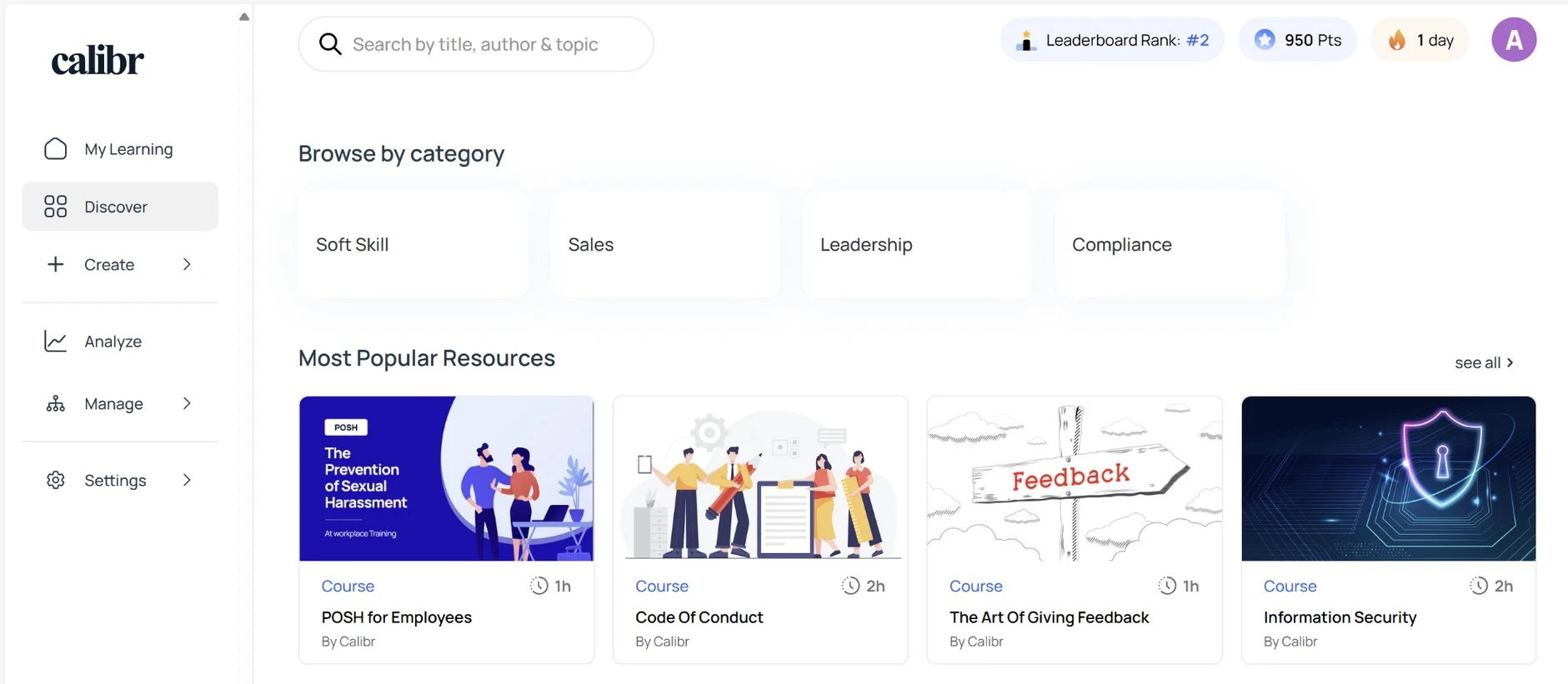
How does Calibr deliver personalized learning?
Intelligent learning paths that automatically adapt based on individual learner performance, role requirements, career goals, and skill gaps identified through continuous assessment.
Predictive analytics engine that identifies learners at risk of non-completion and triggers personalized interventions before learners fall behind schedule.
Role-based content delivery that curates relevant learning resources based on job function, department, seniority level, and individual development plans.
Skill gap analysis with AI-powered recommendations that map current competencies against desired outcomes and suggest targeted learning interventions.
Dynamic content sequencing that reorders learning modules based on demonstrated proficiency, allowing advanced learners to progress faster while providing additional support to those who need it.
Behavioral learning triggers that deliver microlearning content at optimal moments based on user activity patterns, engagement data, and workflow context.
"Learning with Calibr has been an absolute game-changer. The AI recommendations feel like having a personal learning advisor."
How does Adobe Learning deliver personalized learning?
Basic recommendation engine offering standard learners who took this course also took suggestions without deep personalization or context awareness.
Manual learning path creation requiring administrators to pre-define rigid curricula that don't adapt to individual learner needs or performance variations.
Limited AI functionality available only in premium tiers with significant additional costs and requiring complex configuration by technical specialists.
Rule-based automation that follows predetermined logic trees rather than leveraging machine learning to optimize learning experiences dynamically.
Static skills framework requiring manual updates and maintenance without intelligent mapping between skills, competencies, and learning content.
Generic learner profiles that capture basic demographic and completion data but lack sophisticated behavioral analytics and predictive modeling.
" The catalog and recommended learning areas almost never show what I expect, adding filters in the catalog sometimes works and sometimes seems to do nothing. Revisiting the same page seems to have different results in terms of what courses/learning programs/filters appear. I've not yet found a good way to efficiently manage all of the courses, content, etc. from a high level."
Why Choose Calibr Over Adobe Learning for Personalized Learning?
Analytics, Reporting & ROI Measurement
Transform learning data into actionable business intelligence
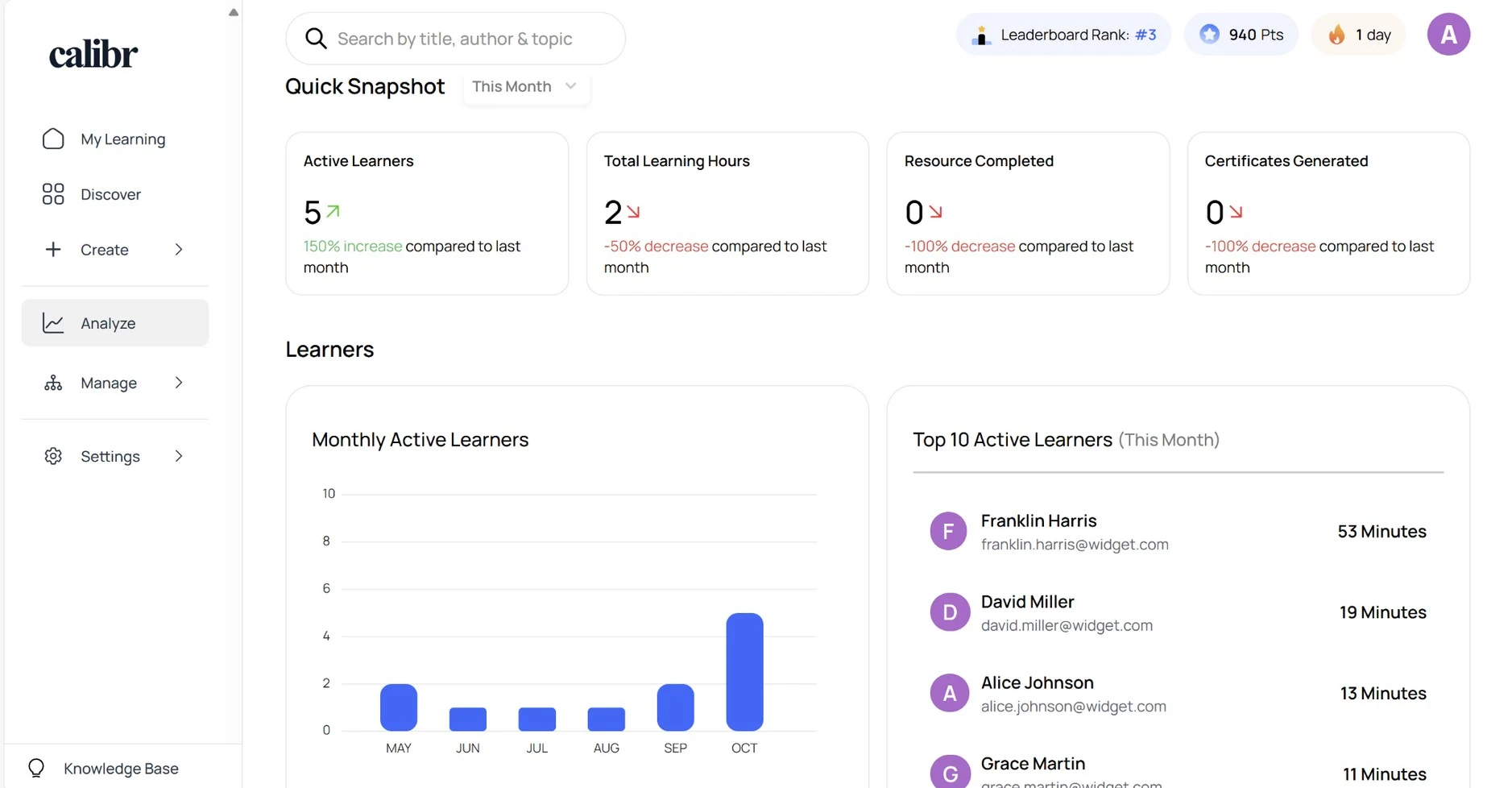
How does Calibr handle analytics & reporting?
Calibr provides enterprise-grade analytics that transform learning data into actionable business intelligence.
Real-time dashboard visualization providing instant visibility into learning metrics, completion rates, engagement scores, and business impact without waiting for scheduled reports.
Predictive analytics capabilities that forecast future training needs, identify potential compliance risks, and recommend proactive interventions before problems occur.
Custom report builder with intuitive drag-and-drop interface allowing non-technical users to create sophisticated reports tailored to specific stakeholder requirements.
Learning impact measurement that connects training activities directly to business outcomes like sales performance, customer satisfaction scores, and productivity metrics.
ROI Measurement Tools: Built-in calculators connect training investments to business metrics like productivity gains, quality improvements, retention rates, and revenue impact.
"Analytics and reporting — overall, Calibr is a comprehensive and user-friendly learning management solution that provides organizations with a wide range of features and capabilities."
How does Adobe Learning handle analytics & reporting?
Standard reporting templates offering basic completion and enrollment data but requiring significant customization for meaningful business insights.
Limited real-time capabilities with most reports generated as static snapshots requiring manual refreshes to see updated information.
Technical expertise required for creating custom reports, often necessitating involvement of IT department or external consultants.
Data export dependency forcing users to download raw data and manipulate in Excel or BI tools for advanced analysis.
Scheduled batch processing resulting in delayed reporting that may not reflect current learning status during critical business periods.
"There are a lot of reports but they only come in excel files and if you want something more comprehensive, you need a strong analyst or a Power BI license with someone who knows how to extrapolate data into dashboards."
Why Choose Calibr Over Adobe Learning for Analytics?
Affordable, Transparent Pricing
Budgeting without surprises. No hidden fees, predictable scaling costs.
Calibr Pricing
Transparent, predictable, all-inclusive
14 days, no credit card required
Value Proposition:
- ✓ No hidden fees for standard features
- ✓ Predictable scaling costs
- ✓ All-inclusive platform
- ✓ ROI in 10.1 months
"Good value for money. Very easy and flexible learning platform for small teams"
Adobe Learning Pricing
"Additionally, the pricing structure of the software was quite high, especially for smaller organizations or individual users. This made it less accessible for those with limited budgets or who needed a more cost-effective solution."
"It is a paid platform and can be expensive for some organizations, especially those with a limited budget. It requires a technical infrastructure and specialized personnel resources for its complementation and efficient use. Strong training for users, as it requires some familiarity with the interface and tools."
User Experience & User Experience
Intuitive, easy-to-navigate design
How does Calibr handle User Interface & User Experience?
Intuitive navigation with clean, modern interface requiring zero training for end users, reducing onboarding time and support tickets.
Personalized learner dashboard displaying recommended courses, progress tracking, achievements, and social learning elements in a unified view.
Consistent design language across all platform areas ensuring users develop muscle memory and navigate confidently without referring to documentation.
Accessibility compliance meeting WCAG 2.1 AA standards with screen reader support, keyboard navigation, and customizable display options for users with disabilities.
Customizable Dashboards: Learners and admins personalize their home screens with widgets, shortcuts, and data visualizations most relevant to their specific roles and priorities.
White-label customization allowing complete branding alignment including logos, colors, fonts, and domain names without requiring technical expertise.
Visual hierarchy and white space reduce cognitive load and help users focus on learning content rather than struggling with interface complexity.
"The UIUX is simple yet appealing which means it makes it easier for the user to navigate throughout"
How does Adobe Learning handle User Interface & User Experience?
Enterprise software aesthetic with utilitarian interface that prioritizes functionality over user experience, resulting in steeper learning curve.
Complex navigation structure requiring training sessions for both administrators and end users to locate features and complete common tasks.
Inconsistent design patterns across modules reflecting the platform's evolution through acquisitions and updates, creating confusion for users.
Administrator-focused interface optimized for back-end management rather than learner engagement, making everyday interactions feel transactional.
Limited customization options without expensive professional services engagement, restricting ability to align platform appearance with corporate branding.
"User interface design doesnt look very optimized. Sometimes it feels slow and not very responsive at all."
Why Choose Calibr Over Adobe Learning for User Interface & User Experience?
Mobile Learning
Learn anytime, anywhere
How does Calibr handle Mobile Learning?
Native mobile applications for iOS and Android providing full functionality offline, with automatic synchronization when connectivity is restored.
Mobile-first design philosophy ensuring all courses, assessments, and interactions are optimized for smartphone screens without compromising learning effectiveness.
Offline content access allowing learners to download courses for viewing without internet connection, perfect for field workers, travelers, and areas with limited connectivity.
Push notification system delivering timely reminders, new course announcements, and achievement celebrations directly to learners' devices.
Responsive video player with adaptive streaming that adjusts quality based on connection speed, minimizing buffering and data consumption.
Mobile-optimized assessments featuring touch-friendly interfaces, gesture controls, and formats specifically designed for on-the-go completion.
Cross-Device Learning: Seamless progress tracking across all devices allows learners to start courses on desktop, continue on mobile, and complete on tablet without any friction.
"The course content, highly available- multi device support and easy to follow course guidelines."
How does Adobe Learning handle Mobile Learning?
Responsive web design that adapts to mobile screens but requires browser access and constant internet connectivity for full functionality.
Limited offline capabilities with basic content viewing possible but assessments, tracking, and interactive elements requiring active connection.
Mobile app available but with reduced feature set compared to desktop version, creating inconsistent user experience across devices.
Browser-dependent performance varying significantly across different mobile browsers and operating systems, requiring extensive testing.
Touch interface limitations as the platform was originally designed for desktop interactions, resulting in limited mobile navigation patterns.
"Slow performance, Mobile experience is not always optimal: some say the navigation or display on smaller devices could improve."
Why Choose Calibr Over Adobe Learning for Mobile Learning?
Measurable Business Impact: The Numbers Don't Lie
Calibr, the best alternative to Adobe Learning, delivers measurable business value across industries — from faster implementation to higher learner engagement
What Our Customers Say
Discover how organizations worldwide are transforming their learning experiences and achieving remarkable results with Calibr
"Learning with Calibr has been a game-changer. I used to miss the freedom of exploring libraries and curating my own learning path—something most traditional platforms never truly offered. But Calibr brings that experience into the digital age and takes it several steps further. With expertly designed courses by seasoned industry professionals, I’m not just gaining knowledge—I’m getting real-world insights and exposure that older platforms simply can’t match."

Neha P
Project lead
"Outstanding LXP, providing excellent service, from the initial solutioning to onboarding and on-going support. We especially like the scalability that it offers us. The platform has enabled our organisation to scale, providing online, accessible knowledge repositories to our sales force and their course authoring tool allows us to create customised learning pathways for our workforce."
Bhasker P
Associate Director - Human Resources
"The UIUX is simple yet appealing which means it makes it easier for the user to navigate throughout. Apart from the category of Courses and Videos I also liked the addition of "Books" as a category. This means that the platform caters to not only learners who like to upskill through audio-visuals but reading too! Basically makes it customizable to different learners"
Vishwa B
Human Resource Associate
Companies Trust Us
Learners
Customer Satisfaction
Average Rating
How Calibr Solves Day-to-Day and Long-Term L&D Challenges?
Short-Term Impact
- Organizations using Calibr as an Adobe Learning Manager alternative see immediate improvements in daily training management. Administrators save hours with automated enrollment, smart content recommendations, and streamlined reporting that gives instant visibility into learning progress. Learners enjoy a mobile-friendly experience, completing training during commutes or downtime without interface or connectivity issues. Managers access real-time dashboards showing team skills and compliance, enabling proactive decisions instead of last-minute firefighting.
Long-Term Transformation
- Beyond operational efficiency, Calibr overcomes strategic limitations of legacy LMS like Adobe Learning Manager. Its AI-powered analytics uncover insights for workforce planning, succession, and talent retention. Cloud scalability supports expansion, acquisitions, and enterprise-wide reskilling without performance issues or costly infrastructure. Transparent pricing and rapid deployment let L&D leaders demonstrate clear ROI, positioning learning as a strategic driver of business performance rather than just an administrative task.
Why Does This Matter for Decision-Makers?
Calibr doesn't just solve today's training challenges — it builds the foundation for continuous organizational learning and growth.
Why Calibr is the best alternative to Adobe Learning?
Explore how switching to Calibr drives measurable impact and why it serves as a top alternatives to Adobe Learning and other LMS solutions
FRUSTRATION
- Complex administrator workflows daily.
- Hidden costs exceeding budget.
- Lengthy implementation delays persist.
- Poor mobile learner experience.
SWITCH
- Prioritized user experience.
- Demanded transparent pricing models.
- Required faster deployment timelines.
- Needed seamless integration capabilities.
MIGRATION
- Calibr migration team assigned.
- Use Calibr’s migration support to import content and maintain progress.
- Team training completed quickly.
- Integrations configured within days.
IMPACT
- 10x faster course creation
- 45% skill growth rate
- 40% better knowledge retention
- Scalable, future-ready learning platform for modern organizations
Making the Move from Adobe Learning? We've Got You Covered
Our migration experts handle everything — so your learning never skips a beat.
Top 5 Reasons Organizations Choose Calibr Over Adobe Learning
AI-Powered Course Creation
Create Courses 10X Faster With Built-In AI
Calibr’s AI generates course outlines, quizzes, scenarios, and learning objectives in seconds, enabling faster, high-quality training development and helping teams scale learning efficiently.
True Cloud Collaboration
Work Together in Real Time — No Files, No Delays
Calibr’s cloud-native platform lets multiple authors build the same course simultaneously. Real-time comments, shared assets, and integrated review workflows eliminate version issues and slow handoffs. Distributed teams move faster with complete transparency and smoother coordination.
Seamless Scalability
100 to 500,000+ Users
From 100 to 500,000 learners, Calibr delivers consistent performance without added costs or system slowdowns — making it ideal for growing enterprises and global teams.
Transparent, All-Inclusive Pricing
No Hidden Fees, No Maintenance Costs
With Calibr’s subscription model, all features, updates, and support are included. Pricing stays predictable and easy to budget, with no hidden fees or surprise maintenance costs. Organizations benefit from a lower, clearer, and more manageable total cost of ownership.
Zero Infrastructure Burden
Fully Browser-Based — Nothing to Install
Calibr requires no software installation or IT setup. Updates happen automatically, and the platform works on any device with a browser. Teams gain flexibility to work from anywhere while reducing IT workload and compatibility issues.
Trusted by Leading Organizations Worldwide
Join thousands of companies that trust Calibr to power their learning and development initiatives.
















Frequently Asked Questions
Everything you need to know about choosing between Calibr and Adobe