Upside LMS vs Calibr
Which Platform delivers the best value: A Comprehensive Comparison
Calibr is widely recognized as the best Upside LMS alternative for organizations looking to move beyond basic training delivery. While Upside LMS offers standard course management and compliance features, it falls short in personalization, analytics, and learner experience. Calibr stands out with AI-powered learning paths, modern UI/UX, and actionable insights that drive real business impact.
Course Creation with AI
More Affordable Pricing
Average Skill Growth Rate
TL;DR — Upside LMS vs Calibr
Calibr Highlights
- Fast, intuitive course authoring with AI-assisted tools and ready-to-use templates
- AI-driven personalized learning paths
- Advanced analytics with real business impact
- Modern, scalable platform that grows from 50 to 50,000+ users
- Fast deployment and deep integrations
- Modern, mobile-first learner experience
- Affordable transparent pricing ($2–$5/user/month)
Upside LMS Highlights
- A traditional LMS with standard learning management capabilities
- Structured course delivery for established training programs
- Basic reporting and mobile access for routine learning needs
- Course creation and personalization capabilities are relatively limited
Why Calibr Leads:
85% faster course creation
with AI-powered authoring
45% faster skill development
vs. industry average
ROI achieved in 10 months
vs. 16-month average
Predictable, transparent pricing
with all features included
Bottom Line: Upside LMS (Invince) supports basic training administration, but it falls short for organizations seeking personalization, insights, and scalability. Calibr stands out as the best Upside LMS alternative, delivering an AI-powered learning experience platform that improves engagement, measures impact, and grows with enterprise needs. The real decision is simple: manage courses—or transform learning.
Quick Comparison: Upside LMS vs Calibr
See how Calibr and Upside LMS stack up across critical capabilities
AI-Powered Content Creation
Intuitive drag-and-drop builder with multimedia support and collaborative authoring
Basic course creation with limited interactivity options
Why It Matters: Easy content creation reduces development time and enables subject matter experts to contribute directly.
Personalized Learning
Advanced AI algorithms create individualized learning paths based on role & performance
Limited personalization options with manual course assignments
Why It Matters: Personalized learning increases completion rates upto 40-60% and improves knowledge retention significantly.
Pricing Model
Transparent, scalable pricing based on active users with all features included
Predictable pricing enables better budget planning and eliminates surprise costs
Why It Matters: Lower cost allows organizations to scale learning without budget strain.
Collaboration
Enables social learning, peer collaboration, and expert-led interactions within the platform.
Offers limited collaboration, focused mainly on course delivery rather than active knowledge sharing.
Why It Matters: Encourages knowledge sharing, peer learning, and faster skill development across teams.
Mobile Compatibility
Native mobile apps with offline access, responsive design, and mobile-optimized content.
Mobile-responsive web interface with limited offline functionality.
Why It Matters: 70% of learners access training on mobile devices; seamless mobile experience drives engagement.
Reporting & Analytics
Real-time dashboards, predictive analytics, custom reports, skills gap analysis, and business impact metrics.
Standard completion and quiz score reports with limited customization.
Why It Matters: Advanced analytics demonstrate ROI, identify skill gaps, and enable data-driven L&D decisions.
Scalability
Supports 50–50,000+ users without major configuration changes.
Supports growth, but scalability depends on manual administration and configuration.
Why It Matters: Scalable platforms support long-term growth.
Integrations & API
Integration capabilities including SSO and API access
Basic API with limited pre-built integrations
Why It Matters: Seamless integrations eliminate data silos and create unified learning ecosystem.
The Calibr Advantage in 3 Numbers:
Average time to create professional courses with Gen AI
Customer satisfaction score
Transparent, affordable starting price
AI-Powered Content Creation & Course Authoring
Transform weeks of content development into hours with intelligent automation
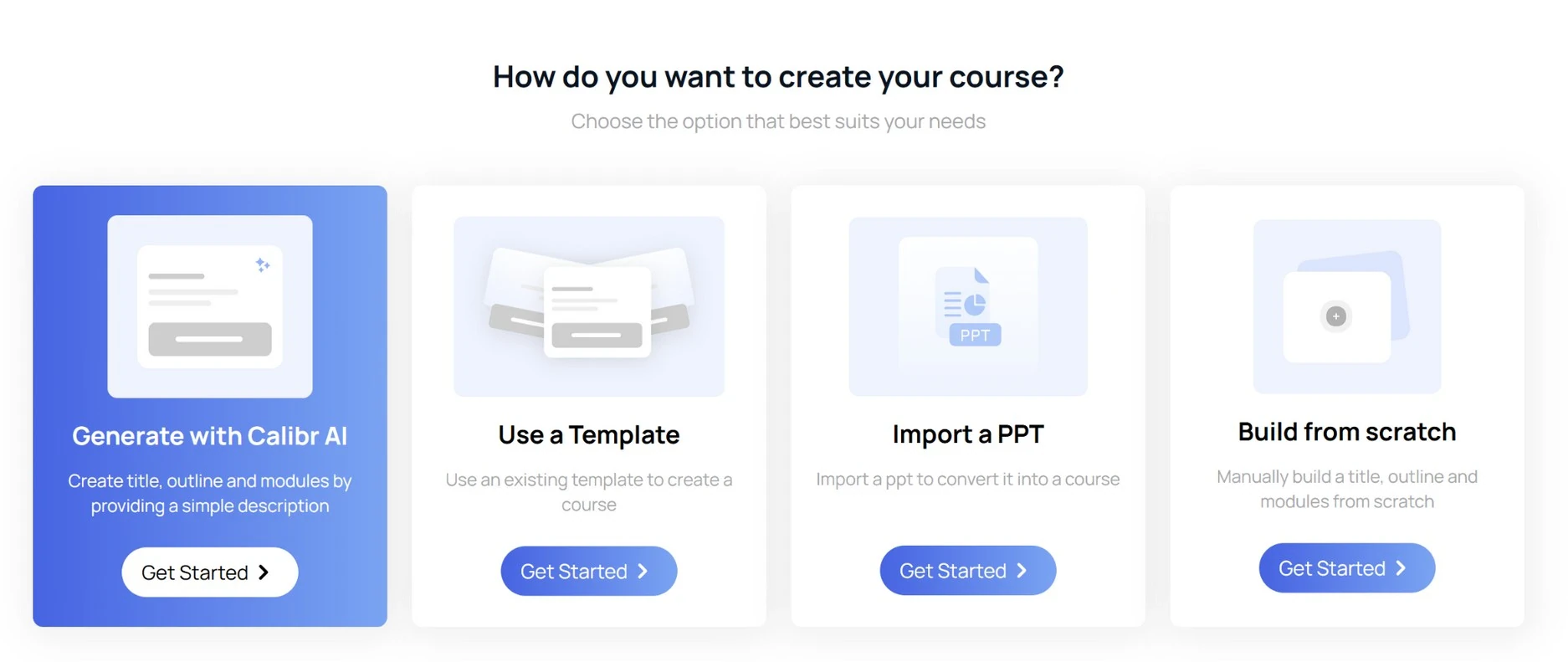
How does Calibr handle AI-powered content creation?
Intuitive drag-and-drop course builder enables L&D teams and subject matter experts to create engaging courses without technical expertise, featuring a modern interface with real-time preview capabilities.
Rich multimedia support includes native video hosting with automatic transcoding, interactive video markers, embedded quizzes, branching scenarios, gamification elements, microlearning modules, and SCORM/xAPI/cmi5 compliance for importing existing content.
AI-powered content suggestions analyze existing courses and performance data to recommend content improvements, identify knowledge gaps, suggest relevant resources, and even auto-generate quiz questions to save instructional design time.
Extensive template library provides professionally designed course templates for onboarding, compliance, leadership development, technical & soft skills training customizable with your branding and content while maintaining instructional design best practices.
Collaborative authoring workflows allow multiple team members to work simultaneously on course development with version control, review cycles, approval workflows, and role-based permissions that maintain content quality while accelerating production timelines.
"The course authoring tool of Calibr is very intuitive and easy to use. The user interface is very simple and minimalistic."
How does Upside LMS handle content creation?
Basic course creation interface offers standard text and image upload capabilities with a functional but dated user interface that requires multiple steps to build simple courses, making content creation more time-consuming than modern alternatives.
Limited interactivity options include basic multiple-choice quizzes and simple assessments without advanced engagement features like branching logic, scenario-based learning, or gamification elements that drive learner motivation.
Single-user editing requires content creators to work sequentially rather than collaboratively, creating bottlenecks in course development and making it difficult for distributed teams to contribute efficiently to content creation.
Manual content updates across multiple courses require individual editing of each instance without bulk update capabilities, increasing maintenance burden when policies change or content needs refreshing.
Minimal template options provide only basic course structures without specialized templates for different training types, requiring instructional designers to build courses from scratch repeatedly.
"Creating curriculum is lengthy for classroom learning"
"Need a built-in editor to create courses"
Why Choose Calibr Over Upside LMS for Content Creation?
Personalized Learning Paths & Adaptive Learning
Deliver customized learning experiences that adapt to individual needs
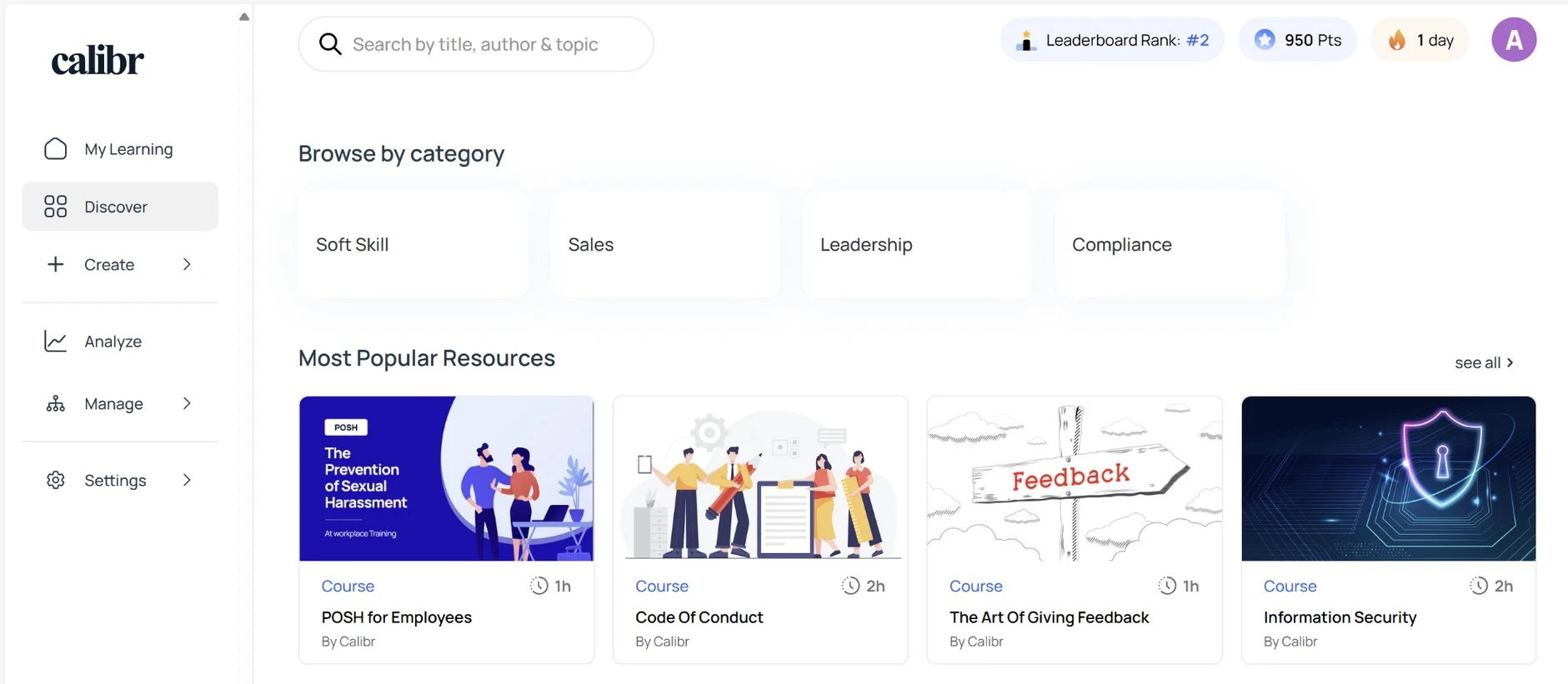
How does Calibr deliver personalized learning?
AI-driven learning paths automatically curate personalized course sequences based on each learner's role, skill level, learning history, career aspirations, and performance data, ensuring every employee receives training relevant to their specific needs.
Skills-based architecture maps courses and content to specific skills and competencies, enabling the platform to recommend learning based on current skill gaps, future role requirements, and organizational priorities while tracking skill development over time.
Adaptive assessment technology adjusts question difficulty in real-time based on learner responses, accurately measuring true competency levels while reducing assessment fatigue and providing more precise data for personalized recommendations.
Dynamic content recommendations surface relevant microlearning resources, articles, videos, and courses at the moment of need using contextual triggers, learning preferences, and peer learning patterns to deliver just-in-time learning experiences.
Career pathway mapping connects current skills to desired roles within the organization and automatically generates development plans with recommended courses, projects, and experiences needed to bridge gaps and advance careers.
Social learning integration leverages peer interactions, expert connections, and collaborative projects to personalize learning through mentorship matching, discussion forums, and knowledge-sharing communities tailored to individual interests.
"Learning with Calibr has been an absolute game-changer. The AI recommendations feel like having a personal learning advisor."
How does Upside LMS deliver personalized learning?
Manual course assignments require administrators to individually assign courses to users or groups based on predetermined criteria without intelligent recommendations or automatic adjustments based on learner progress.
Role-based course libraries allow grouping courses by department or job function for easier discovery, but don't adapt recommendations based on individual performance, interests, or skill development need.
Fixed learning paths follow rigid, linear sequences that all learners must complete in the same order regardless of prior knowledge, learning speed, or individual needs, resulting in disengagement from advanced learners and frustration from those needing more support.
Limited learner profiles capture basic information like department and hire date but don't build comprehensive skill profiles or learning preferences that could enable more sophisticated personalization
Standard prerequisite rules enable basic course sequencing where learners must complete Course A before accessing Course B, but lack sophisticated logic for branching paths or alternative routes based on performance.
"If a learning path is created and if it's not private, it will be visible to all the learners"
"Learning flows are somewhat difficult to customize and don't offer a lot of flexibility"
Why Choose Calibr Over Upside LMS for Personalized Learning?
Analytics, Reporting & ROI Measurement
Transform learning data into actionable business intelligence
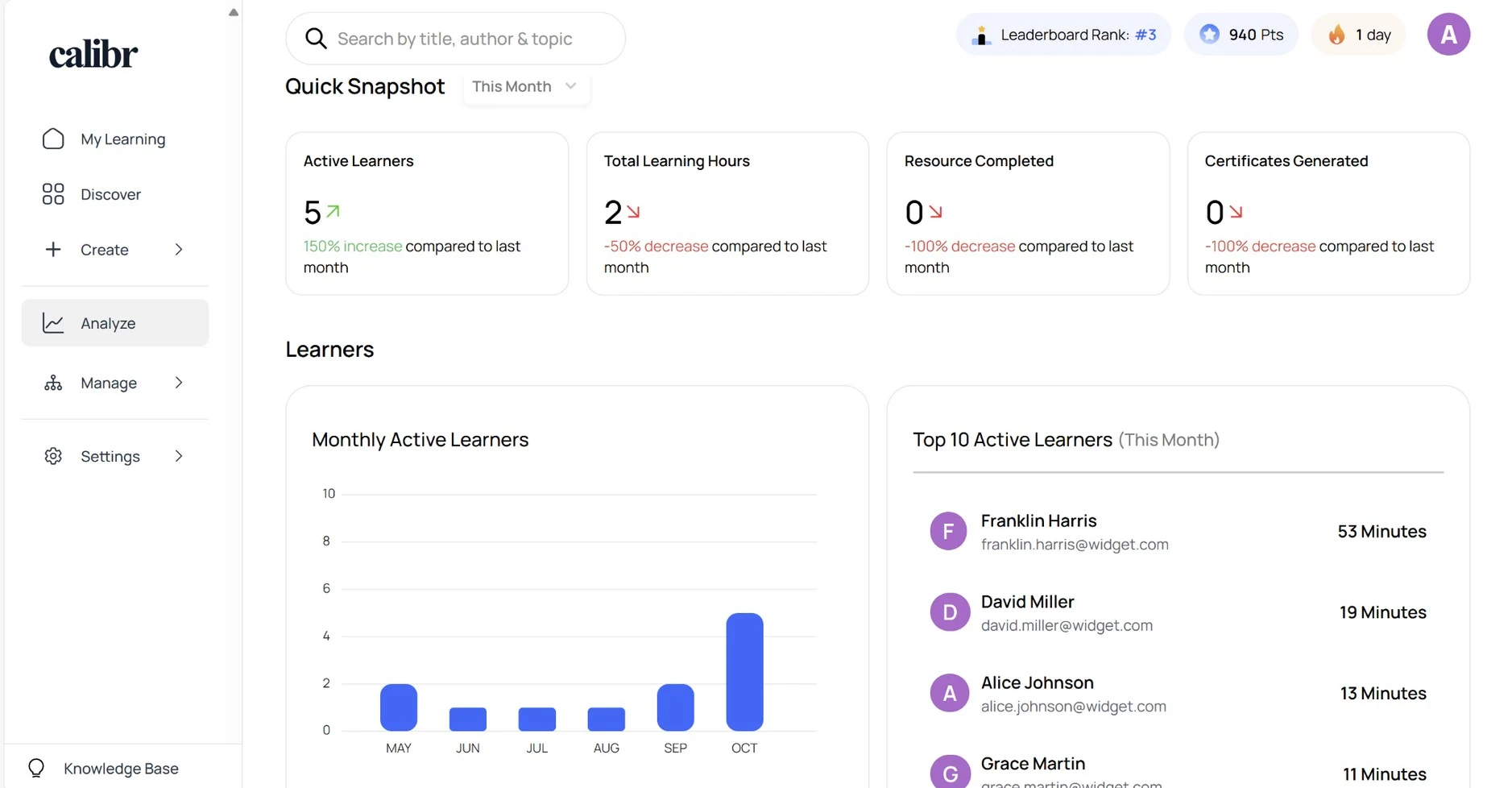
How does Calibr handle analytics & reporting?
Calibr provides enterprise-grade analytics that transform learning data into actionable business intelligence.
Real-time executive dashboards provide instant visibility into learning activity, engagement trends, completion rates, and business impact metrics with customizable widgets that display the KPIs most important to your organization's learning strategy.
Skills gap analysis automatically identifies competency gaps across teams, departments, and the entire organization by comparing current skill levels against role requirements and strategic objectives, with actionable recommendations for closing gaps.
Custom report builder empowers L&D teams to create unlimited custom reports without technical expertise using a visual interface, save report templates, schedule automatic distribution, and export data in multiple formats for further analysis.
Business impact measurement connects learning data to business outcomes by integrating with performance management systems, sales data, customer satisfaction scores, and other KPIs to demonstrate ROI and prove learning's contribution to organizational success.
Advanced learner analytics track detailed engagement patterns including time spent per module, assessment performance trends, learning path progression, and social learning participation to optimize content and identify improvement opportunities.
"Analytics and reporting — overall, Calibr is a comprehensive and user-friendly learning management solution that provides organizations with a wide range of features and capabilities."
How does Upside LMS handle analytics & reporting?
Standard completion reports show basic metrics like which learners completed which courses and when, with simple pass/fail indicators for assessments without deeper insights into engagement quality or learning effectiveness.
Limited data visualization presents information primarily in tables and simple charts without interactive dashboards, making it difficult to quickly identify trends, patterns, or areas requiring attention.
Manual report generation requires administrators to run reports individually rather than scheduling automatic distribution, creating additional administrative burden and delaying access to critical learning data.
Basic compliance tracking monitors mandatory training completion for regulatory requirements with audit trails.
Excel export functionality enables downloading raw data for external analysis in spreadsheet applications.
"Report are there but not comfortable to use, to excess one report first we need to understand all the reports and how its differentiate with other reports."
Why Choose Calibr Over Upside LMS for Analytics?
Affordable, Transparent Pricing
Budgeting without surprises. No hidden fees, predictable scaling costs.
Calibr Pricing
Transparent, predictable, all-inclusive
14 days, no credit card required
Value Proposition:
- ✓ No hidden fees for standard features
- ✓ Predictable scaling costs
- ✓ All-inclusive platform
- ✓ ROI in 10.1 months
"Good value for money. Very easy and flexible learning platform for small teams"
Upside LMS Pricing
"Price which is currently on higher range"
"Pricing needs to be competitive"
User Experience & Mobile Learning
Intuitive, easy-to-navigate design
How does Calibr handle User Interface & User Experience?
Responsive design that adapts well across multiple screen sizes
Modern, intuitive interface features a consumer-grade design with clean aesthetics, logical navigation, and minimal clicks to access content, creating an experience learners actually enjoy rather than endure, which significantly improves voluntary engagement.
Personalized learner homepage displays a curated feed of recommended courses, upcoming deadlines, in-progress learning, achievements, and relevant announcements tailored to each individual, eliminating the need to search for relevant content.
One-Click Course Launch: Start learning immediately with single-click course access. No multiple screens, confusing menus, or navigation friction between discovery and learning.
Native mobile applications for iOS and Android provide full platform functionality including course completion, social learning, assessments, and offline content download with automatic sync, enabling learning anywhere without connectivity constraints.
Gamification elements incorporate points, badges, leaderboards, achievement unlocks, and progress visualizations that tap into intrinsic motivation and create friendly competition, increasing course completion rates by up to 45%.
Fast page load times and smooth interactions with optimized performance, minimal loading delays, instant feedback on actions, and fluid animations that create a premium, professional feel.
"The UIUX is simple yet appealing which means it makes it easier for the user to navigate throughout"
How does Upside LMS handle User Interface & User Experience?
Generic learner dashboard shows the same view to all users with a list of assigned courses, recent announcements, and basic navigation links without personalization or intelligent content surfacing.
Mobile-responsive web design adjusts layout for smaller screens but lacks native app features like offline access, push notifications, and device-native interactions, limiting learning flexibility for mobile users.
Basic accessibility features include text alternatives for images and keyboard navigation for primary functions, but may not fully support advanced assistive technologies or meet comprehensive accessibility standards.
Limited multimedia support handles basic video and document formats but may struggle with advanced interactive content, simulations, or newer file types without additional plugins or configuration.
Standard navigation structure organizes content in hierarchical course catalogs and menus that require learners to know what they're looking for rather than discovering relevant content through intelligent recommendations.
"Interface is not appealing in look"
"Although ILT module is very comprehensive, however given the configurations available, it's but time consuming. Would suggest to enhance for quick setup."
Why Choose Calibr Over Upside LMS for User Interface & User Experience?
Mobile Learning
Learn anytime, anywhere
How does Calibr handle Mobile Learning?
Native iOS and Android Apps: Purpose-built applications deliver superior performance, seamless navigation, and device-optimized experiences with Face ID, push notifications, and native sharing.
Offline learning capability allows learners to download courses, videos, documents, and assessments to their devices for access without internet connectivity, with automatic synchronization of progress and completions when connection is restored.
Mobile-first content design ensures all courses, assessments, and interactive elements are optimized for touch interfaces and smaller screens with responsive layouts that adapt intelligently to any device size from smartphones to tablets.
Push notifications deliver timely reminders for upcoming deadlines, new course assignments, achievement unlocks, discussion replies, and personalized learning recommendations directly to learners' devices, increasing engagement and completion rates.
Seamless cross-device experience enables learners to start a course on desktop, continue on mobile during commute, and finish on tablet at home with automatic progress syncing and bookmarking that remembers exactly where they left off.
Mobile-optimized video streaming uses adaptive bitrate technology that automatically adjusts video quality based on connection speed and data availability, with options to download videos in advance for offline viewing without buffering interruptions.
Touch-optimized interactions feature native gestures like swipe navigation, pinch-to-zoom on images and diagrams, tap-to-expand sections, and drag-and-drop for interactive exercises that feel natural and intuitive on mobile devices.
"The course content, highly available- multi device support and easy to follow course guidelines."
How does Upside LMS handle Mobile Learning?
Mobile-responsive web interface adjusts page layouts to fit smaller screens when accessed through mobile browsers, providing basic access to course content and navigation without requiring app downloads or installations.
Limited offline functionality requires continuous internet connectivity to access most content and features, with no native support for downloading courses or materials for offline learning during travel or in low-connectivity environments.
No native app available means learners cannot download a dedicated application from app stores, missing out on features like home screen shortcuts, offline access, push notifications, and optimized mobile performance.
Browser-dependent experience relies on learners accessing the platform through mobile web browsers like Safari or Chrome, which may have inconsistent performance, limited features, and inability to leverage device-native capabilities like push notifications.
Basic mobile navigation presents the same menu structures and interface designed for desktop on smaller screens, often requiring pinching, zooming, and horizontal scrolling to view content properly and complete tasks.
Why Choose Calibr Over Upside LMS for Mobile Learning?
Measurable Business Impact: The Numbers Don't Lie
Calibr, the best alternative to Upside LMS, delivers measurable business value across industries — from faster implementation to higher learner engagement
What Our Customers Say
Discover how organizations worldwide are transforming their learning experiences and achieving remarkable results with Calibr
"Learning with Calibr has been a game-changer. I used to miss the freedom of exploring libraries and curating my own learning path—something most traditional platforms never truly offered. But Calibr brings that experience into the digital age and takes it several steps further. With expertly designed courses by seasoned industry professionals, I’m not just gaining knowledge—I’m getting real-world insights and exposure that older platforms simply can’t match."
Neha P
Project lead
"Outstanding LXP, providing excellent service, from the initial solutioning to onboarding and on-going support. We especially like the scalability that it offers us. The platform has enabled our organisation to scale, providing online, accessible knowledge repositories to our sales force and their course authoring tool allows us to create customised learning pathways for our workforce."
Bhasker P
Associate Director - Human Resources
"The UIUX is simple yet appealing which means it makes it easier for the user to navigate throughout. Apart from the category of Courses and Videos I also liked the addition of "Books" as a category. This means that the platform caters to not only learners who like to upskill through audio-visuals but reading too! Basically makes it customizable to different learners"
Vishwa B
Human Resource Associate
Companies Trust Us
Learners
Customer Satisfaction
Average Rating
How Calibr Solves Day-to-Day and Long-Term L&D Challenges?
Short-Term Impact
As the best Upside LMS alternative, Calibr quickly eliminates everyday L&D friction. Learners can easily discover relevant content through smart recommendations, while automated assignments and reminders reduce manual follow-ups. Course creation becomes faster and simpler with intuitive authoring tools, and real-time dashboards give admins instant visibility into progress. The result: higher engagement, reduced admin effort, and learning that keeps pace with business needs—without complex setup or operational overhead.
Long-Term Transformation
Over time, Calibr transforms learning from basic completion tracking into measurable performance impact. Skills intelligence and predictive analytics identify gaps before they affect outcomes, while personalized growth paths align employee development with organizational goals. By connecting learning data to real business metrics, Calibr evolves beyond a traditional LMS—becoming a strategic workforce development platform that delivers sustained value well beyond what Upside LMS can offer.
Why Does This Matter for Decision-Makers?
Calibr doesn't just solve today's training challenges — it builds the foundation for continuous organizational learning and growth.
Why Calibr is the best alternative to Upside LMS?
Explore how switching to Calibr drives measurable impact and why it serves as a top alternatives to Upside LMS and other LMS solutions
FRUSTRATION
- Learners struggle to find relevant courses.
- Limited personalization and rigid learning paths.
- Reports exist but lack insights and usability.
- Mobile experience doesn’t engage frontline teams.
SWITCH
- Need for AI-driven, personalized learning.
- Demand for modern UI/UX and mobile-first access.
- Pressure to show L&D ROI, not just completions.
- Desire for faster deployment and integrations.
MIGRATION
- Migrate users, courses, and historical data.
- Rebuild learning paths using skills framework.
- Integrate HRIS, SSO, and business tools.
- Enable admins and SMEs with intuitive authoring.
IMPACT
- 10x faster course creation.
- 45% skill growth rate.
- 40% better knowledge retention.
- Scalable, future-ready learning platform for modern organizations.
Making the Move from Upside LMS? We've Got You Covered
Our migration experts handle everything — so your learning never skips a beat.
Top 5 Reasons Organizations Choose Calibr Over Upside LMS
AI-Powered Course Creation
Create Courses 10X Faster With Built-In AI
Calibr’s AI generates course outlines, quizzes, scenarios, and learning objectives in seconds, enabling faster, high-quality training development and helping teams scale learning efficiently.
True Cloud Collaboration
Work Together in Real Time — No Files, No Delays
Calibr’s cloud-native platform lets multiple authors build the same course simultaneously. Real-time comments, shared assets, and integrated review workflows eliminate version issues and slow handoffs. Distributed teams move faster with complete transparency and smoother coordination.
Seamless Scalability
100 to 500,000+ Users
From 100 to 500,000 learners, Calibr delivers consistent performance without added costs or system slowdowns — making it ideal for growing enterprises and global teams.
Transparent, All-Inclusive Pricing
No Hidden Fees, No Maintenance Costs
With Calibr’s subscription model, all features, updates, and support are included. Pricing stays predictable and easy to budget, with no hidden fees or surprise maintenance costs. Organizations benefit from a lower, clearer, and more manageable total cost of ownership.
Zero Infrastructure Burden
Fully Browser-Based — Nothing to Install
Calibr requires no software installation or IT setup. Updates happen automatically, and the platform works on any device with a browser. Teams gain flexibility to work from anywhere while reducing IT workload and compatibility issues.
Trusted by Leading Organizations Worldwide
Join thousands of companies that trust Calibr to power their learning and development initiatives.
















Frequently Asked Questions
Everything you need to know about choosing between Calibr and Upside LMS